
ClipBoardPrime
Fast, Private, Keyboard-Driven Clipboard Manager for Windows
Store clipboard history locally, paste only after the target window is verified, keep the workspace exactly where you left it, and turn useful clips into organized notes.
A Maximus Prime Software Product
Capabilities
Why ClipBoardPrime?
New in v1.0.4
Verified-target paste protection, serialized paste operations, persistent maximized state, Always on Top, native edge/corner Snap, and a clearer Settings experience.
Rich Clipboard History
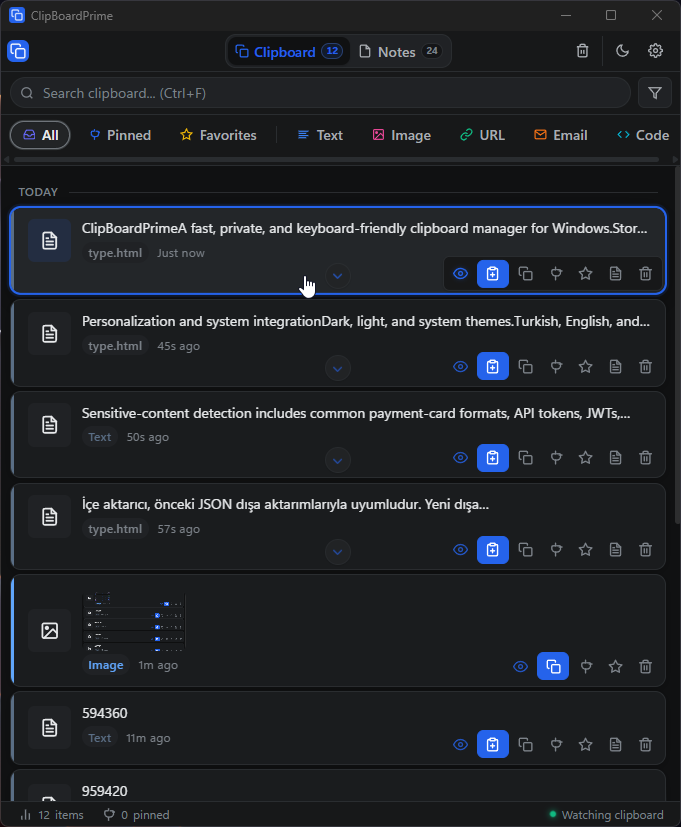
Monitors text, HTML, URLs, emails, code snippets, and images. Features Space-bar quick preview and instant live fuzzy search.
Verified Win32 Auto-Paste
Confirms the remembered target still exists and owns focus, queues rapid requests, then pastes through the native SendInput API—otherwise it safely cancels.
Notes & Color Categories
Convert clipboard items into permanent notes, organize with color-coded categories, pin, and favorite important entries.
Hardware-Backed Security
Encrypt data with Windows safeStorage (DPAPI) & AES-256-GCM. Automatically mask credit cards, API tokens, and sensitive strings.
Keyboard First
Shortcuts & Controls
Privacy First
Security & Isolation Architecture
100% Local Storage
No cloud endpoints, remote databases, or telemetry. Your data stays entirely on your machine.
AES-256-GCM & DPAPI
Master encryption keys are wrapped using OS account-backed Windows DPAPI via Electron safeStorage API.
Encrypted .cpbackup
Portable backups are exported with AES-256-GCM and scrypt key derivation, protected with user passwords.
Interface
Application Screenshots
Click any image to view in full-screen detail
Distribution
Installation & Requirements
📥 Standard Installer
Installs into standard Windows directories with optional launch at startup.
ClipBoardPrime.Setup.Recommended.1.0.4.exe📦 Portable Executable
Keeps application data inside adjacent data folder; requires no installation.
ClipBoardPrime.Portable.1.0.4.exe